






























How to Build an AP Exception Queue in 2026 Without Reviewing Every Invoice
 Copied!
 Design an AP exception queue that lets complete, correctly matched invoices move efficiently while routing document defects, mismatches, supplier changes and technical failures to the right human reviewer.
An accounts-payable team should review exceptions, not every invoice. Let routine invoices pass through automated validation only when the evidence is complete, the checks agree and no risk rule is triggered. Everything else should enter a controlled queue with a reason, an owner and a clear route to resolution.
The important design choice is not whether to automate. It is deciding which invoices can move without another touch, which need finance judgment and which must stop before approval or payment.
TL;DR
- Separate validation, approval and payment release. They are different control points.
- Send an invoice to the queue only when a named rule fails, required evidence is missing or confidence falls below an agreed threshold.
- Give every exception a reason code, priority, owner, due time and permitted next action.
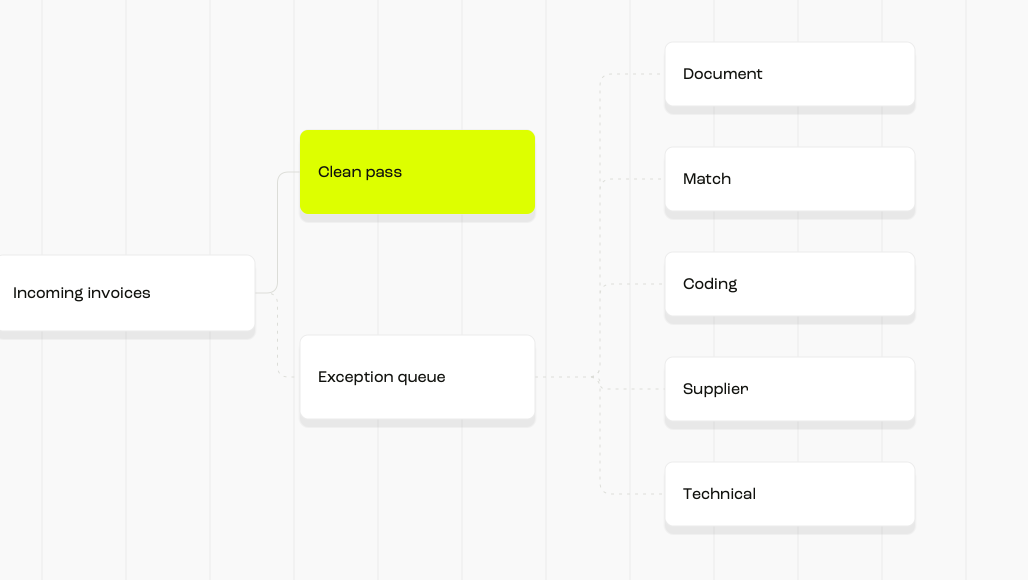
- Use separate lanes for document defects, commercial mismatches, supplier changes, policy breaches and technical failures.
- Measure the percentage of invoices that pass correctly, not simply the percentage that avoid human review.
- Keep consequential approval with a named human, even when automation prepares the decision.
See how we prepare invoices for approval
What should an AP exception queue do in 2026?
An effective queue is a decision system. It should collect invoices that cannot safely continue, explain why each one stopped and send it to the person who can resolve that specific problem.
It should not become a second inbox containing every invoice. If reviewers still open routine, complete and correctly matched invoices, the workflow has digitised manual checking rather than removed it.
The queue therefore sits between capture and approval. It is not itself approval, and clearing an extraction error must not silently authorise the invoice or release money.
In our accounts-payable workflow, we read and code incoming invoices and flag duplicates, unusual amounts and changed supplier bank details before payment approval. That gives a lean finance team a practical starting point for exception review. It does not mean every reason code, owner or closure rule in this guide is already a Round setting.
Start with a state model, not a list of alerts
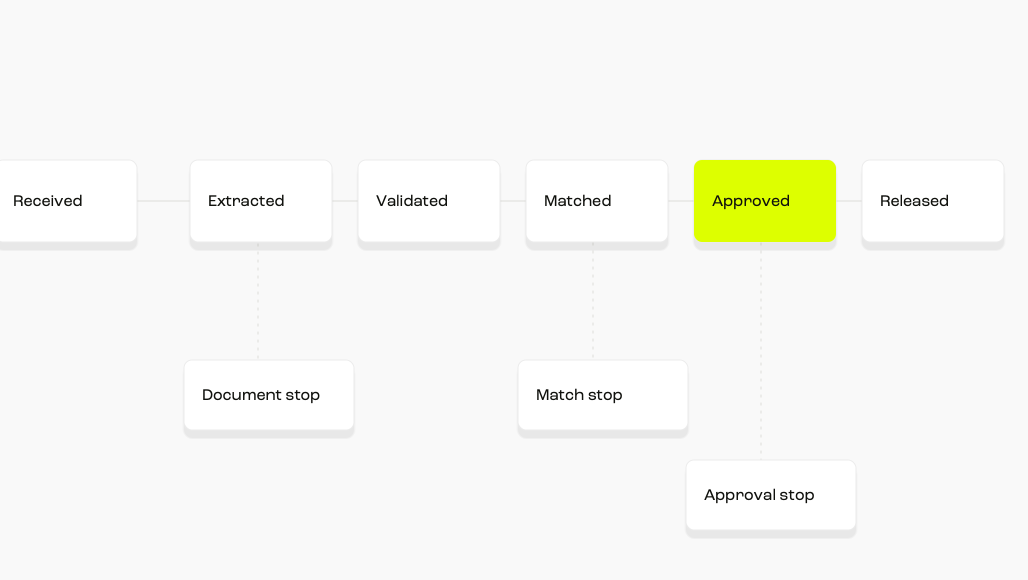
Every invoice should have one current state. A useful minimum model is:
- Received: the original document has been stored and given a stable identifier.
- Extracted: required fields have been read, with confidence and provenance retained.
- Validated: format, supplier, duplicate and accounting checks have passed.
- Matched: the invoice agrees with the applicable order, receipt, contract or approved non-PO route.
- Approved: a person with the correct authority has accepted the commercial obligation.
- Released: the approved item has entered a payment run under separate payment controls.
An exception interrupts one transition. That wording matters. A missing purchase-order number blocks matching; it does not necessarily mean the invoice is false. A changed bank account blocks payment release; it should not erase the otherwise valid invoice record.
Which invoices should enter the queue?
Begin with a short set of objective triggers. Each trigger needs a machine-readable reason code and an operational definition that two reviewers would interpret the same way.
- Document exception: unreadable file, unsupported format, missing page or conflicting totals.
- Required-field exception: missing invoice number, supplier identity, date, amount, currency or tax information.
- Duplicate exception: the supplier, invoice reference, amount or document fingerprint resembles an existing item.
- Match exception: price, quantity, tax, receipt or contract terms fall outside an agreed tolerance.
- Coding exception: the proposed account, cost centre, entity or project is missing or conflicts with policy.
- Supplier exception: the supplier is new, inactive, blocked or has submitted changed payment details.
- Approval exception: there is no eligible approver, the amount exceeds authority or segregation rules would be broken.
- Technical exception: an integration, posting or synchronisation step failed.
Do not combine these into a single “needs review” status. A reviewer who sees only that label must rediscover the problem, decide who owns it and work out what evidence is missing. The queue should do that classification first.
Use document requirements as validation rules
For UK invoices, build the baseline from the applicable official guidance rather than from the fields your extraction tool happens to recognise. GOV.UK states, “Your invoice must include: a unique identification number”, alongside supplier, customer, description, date and amount information.
Tax evidence deserves its own hard stop. HMRC says, “You cannot reclaim VAT using an invalid invoice”. HMRC also says, “You must keep a record of everything you buy and sell”. These requirements support separate reason codes for an invalid tax document and a missing accounting record.
HMRC’s VAT guide says, “A VAT invoice is a document containing certain information about what you’re supplying.” That is why the queue needs a separate tax-document rule rather than treating every missing field alike.
When a supplier provides a UK VAT number, use the HMRC checking service as part of the evidence record. The service checks “if a UK VAT registration number is valid” and the name and address registered to it. A result should inform the tax-document review, not replace the rest of the approval controls.
A failed document check should route to correction or supplier query. It should not be treated as an approval request.
Use confidence to route, not to declare truth
Extraction confidence can help decide whether a field needs inspection. It cannot prove that an invoice is legitimate or commercially correct.
Amazon Textract documents the underlying concept plainly: “A confidence score is a number between 0 and 100 that indicates the probability that a given prediction is correct.” Its guidance says, “The application should discard results below that threshold or flag situations as requiring a higher level of human scrutiny.”
Set thresholds by field and consequence. A weak description may be recoverable from a purchase order. Low confidence in the amount, supplier identity, bank details or tax number should stop the relevant transition.
What must reviewers see on each queue item?
A queue works when the reviewer can decide from one compact record. Opening five systems to reconstruct the case recreates manual review.
Show these elements together:
- Exception reason: the failed rule, observed value and expected value.
- Source evidence: the original invoice and the relevant order, receipt, contract or supplier record.
- Decision context: entity, currency, due date, amount, requester and previous approvals.
- Risk context: whether the supplier or payment details changed and which independent checks remain outstanding.
- Permitted actions: correct, request evidence, assign, reject, approve at the proper stage or escalate.
- History: who changed what, when they did it and why.
Limit the personal data displayed to what the reviewer needs. The ICO describes data minimisation as personal data being “limited to what is necessary”. That principle should shape queue views, exports and notifications, especially when invoices contain names, addresses or bank information.
Route by the problem, not by the invoice total alone
Value thresholds remain useful, but they are only one dimension. The right owner is usually the person who can resolve the cause without receiving authority they should not have.
A supplier bank-detail change warrants its own controlled lane. The NCSC says the overarching goal of a supply-chain cyber-security assessment is to gain assurance about suppliers, their services and products “in proportion to the level of risk”. Apply that principle by recording independent verification before payment details are used, rather than letting a routine invoice match clear the change.
Routing should also support absence. Give every queue a substitute owner, an escalation time and a rule for items approaching their payment date. Do not let delegation change the underlying approval limit.
What can existing systems teach you?
Current accounting platforms expose useful design patterns, even if your own workflow uses different software.
Microsoft documents a dedicated exception location: “You can access the new list page for invoice exceptions at Accounts payable > Invoices > Import failures > Vendor invoices that failed to import.” The useful pattern is a distinct operational view for failed imports, rather than mixing them with commercial approval. Microsoft’s Invoice capture FAQ also says, “Manual intervention is required only if there are warnings or errors.” That is a useful boundary for a queue rule: manual review should follow a defined trigger, not be the default for every document.
Oracle NetSuite documents outcome-based handling: “A bill that doesn't have discrepancies is set to have an Approved status.” It also states, “A bill that has discrepancies is flagged for an exception.” Your policy may require an additional human approval even after a clean match, but the separation between pass and exception is the important part.
Oracle’s invoice-hold documentation adds another boundary: “For others, you must fix the exception condition before the hold is released.” A queue action should therefore address the condition, not merely remove the hold.
Xero describes rule-led routing in similar terms: “Automated routing sends invoices to the right approver based on rules you define, such as value thresholds or cost centres.” Treat those rules as controlled configuration. Record their owner, effective date and change history.
Keep validation, approval and payment release separate
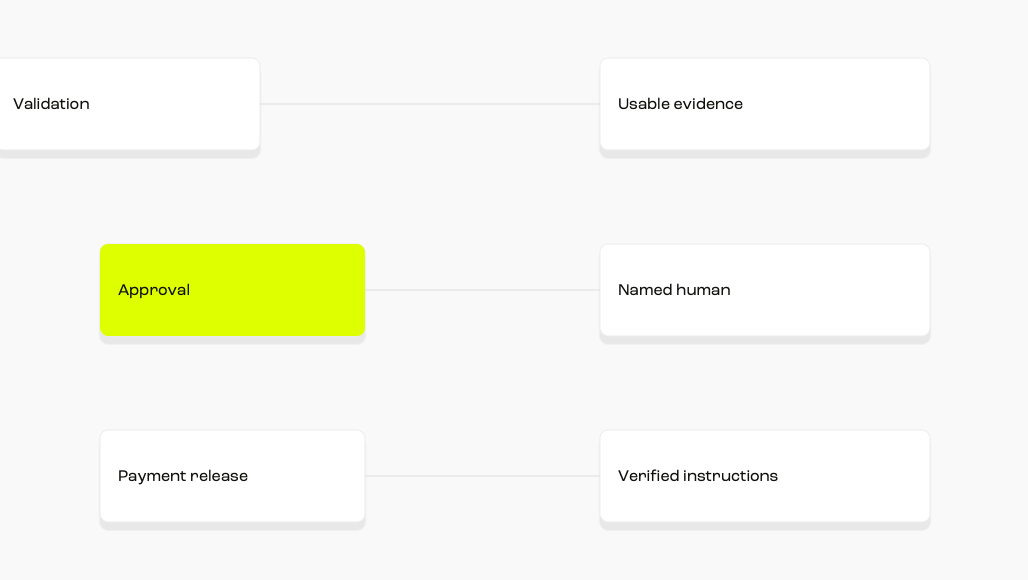
The strongest workflow uses three control layers:
- Validation: is the record complete, internally consistent and supported by the expected evidence?
- Approval: does an authorised person accept that the organisation owes this amount for this purpose?
- Payment release: should this approved liability be included in this payment run to these verified details?
A person correcting tax coding should not gain the power to approve the spend. An approver should not be able to edit supplier bank details inside the approval action. A payment operator should see unresolved holds and should not be able to override them without a separately recorded authority.
For our own operating model, Automation prepares, reads and surfaces exceptions; named humans retain consequential approval. That is the boundary an exception-led process should preserve.
How much review can an exception model remove?
Use your own invoice history for the business case. The following arithmetic is an illustrative scenario, not a promised outcome.
- Monthly volume: 2,000 invoices.
- Assumed clean-pass rate after calibration: 70%.
- Invoices entering the queue: 2,000 × 30% = 600.
- Assumed review time: four minutes per queued item.
- Exception-review time: 600 × 4 minutes = 2,400 minutes, or 40 hours.
- Reviewing every invoice at the same four minutes: 2,000 × 4 minutes = 8,000 minutes, or about 133.3 hours.
- Illustrative difference: about 93.3 reviewer hours each month.
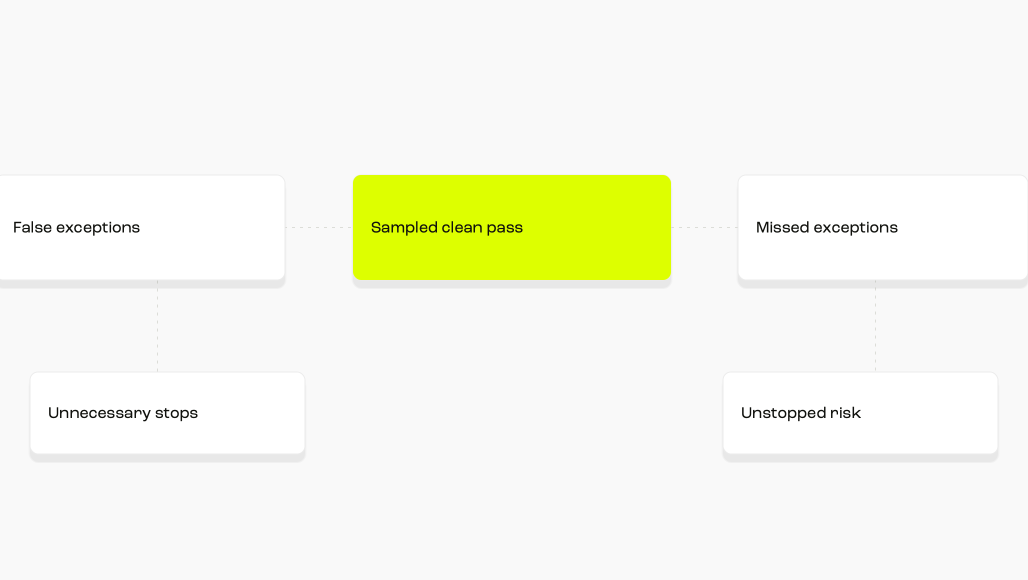
The calculation is only useful if the 70% clean-pass group is correct. Sample passed invoices, monitor later corrections and track any item that reaches payment with a missed exception. Optimising solely for a higher pass rate can weaken the control.
Implement the queue in controlled stages
- Map current decisions. List every reason an invoice is opened, changed, returned, rejected or escalated.
- Create reason codes. Merge duplicates, define each trigger and name the evidence needed to clear it.
- Separate workflow stages. Prevent correction, approval and payment release from collapsing into one action.
- Choose conservative thresholds. Start with conditions your records can support, then calibrate from sampled outcomes.
- Pilot one population. Use a bounded entity, supplier group or invoice type with an identified control owner.
- Review false outcomes. Examine both unnecessary exceptions and incorrect clean passes.
- Expand deliberately. Add new rules only when their owner, evidence and downstream effect are clear.
During the pilot, keep a manual fallback that preserves the audit record. A fallback should not mean forwarding a document through private messages or approving outside the system.
Which measures show whether the queue is working?
Report performance by reason code and workflow stage. A single automation percentage conceals whether the queue is accurate or merely permissive.
- Clean-pass rate: invoices that advanced without review.
- Exception rate: invoices stopped, split by reason and supplier.
- False-exception rate: reviewed items where the trigger proved unnecessary.
- Missed-exception rate: passed items later found to contain a condition that should have stopped them.
- Resolution time: median and ageing by exception class.
- Rework rate: items returned after an attempted resolution.
- Payment impact: items delayed past their intended payment date because of unresolved exceptions.
- Override rate: holds or rules bypassed, with owner and rationale.
Review a sample from both sides of the decision boundary. Inspecting exceptions alone tells you whether the queue contains work. Sampling clean passes tells you whether it contains the right work.
Where Round Treasury fits in an AP exception queue
We capture invoice details and prepare payments for approval. Our AP workflow flags duplicates, unusual amounts and changed supplier details. For a team reviewing too many routine invoices, those are useful early signals. Finance still needs to decide who investigates each flag, what evidence clears it and who can approve the payment.
Start with five lanes: document quality, matching, coding, supplier control and technical failure. Use your ERP first if the gap is an unconfigured approval rule. If the difficulty is coordinating invoice preparation, exception review and payment approval, test our workflow against a month of real invoices. Ask us to show how your team would see and resolve a duplicate, an unusual amount and a changed payee before any payment moves.
Check the connected ledger path too: our Xero integration sends invoices uploaded to Round to Xero; our NetSuite integration sends uploaded invoices through Apideck. Verify the field mapping, approval boundary and failed-sync handling in your own configuration. As at 30 September 2026, our pricing page marks advanced approval rules and routing as coming soon. Ask us to demonstrate any required queue rules in your configuration.
Sources
- https://www.gov.uk/invoicing-and-taking-payment-from-customers/invoices-what-they-must-include
- https://www.gov.uk/charge-reclaim-record-vat/keeping-vat-records
- https://www.gov.uk/guidance/vat-guide-notice-700
- https://www.gov.uk/check-uk-vat-number
- https://ico.org.uk/for-organisations/uk-gdpr-guidance-and-resources/data-protection-principles/a-guide-to-the-data-protection-principles/data-minimisation/
- https://docs.aws.amazon.com/textract/latest/dg/textract-best-practices.html
- https://learn.microsoft.com/en-us/dynamics365/finance/accounts-payable/vendor-invoice-automation
- https://learn.microsoft.com/en-us/dynamics365/finance/accounts-payable/invoice-capture-faq
- https://docs.oracle.com/en/cloud/saas/netsuite/ns-online-help/section_N2376194.html
- https://docs.oracle.com/en/cloud/saas/financials/25d/fappp/how-invoice-holds-work.html
- https://www.xero.com/uk/accountant-bookkeeper-guides/automated-accounts-payable/
- https://www.ncsc.gov.uk/collection/board-toolkit/principle-a-risk-management/collaborating-with-your-supply-chain-and-partners
- Round Treasury: Invoice Automation
- Round Treasury: Accounts Payable
- Round Treasury: Xero Integration
- Round Treasury: NetSuite Integration
Nothing within this blog is intended to be a recommendation. Round does not offer financial advice.
Frequently Asked Questions
It is a controlled worklist for invoices that cannot continue because evidence is missing, a rule failed or a person must make a defined judgment.
No. An invoice can pass capture and validation without manual review while still requiring approval or payment release by an authorised person.
No. Set documented tolerances by risk and policy. A permitted rounding difference is different from a quantity discrepancy or changed supplier account.
Ownership should follow the cause. AP owns document defects, buyers resolve commercial mismatches, control teams investigate risk triggers and finance systems teams repair integration failures.
Use field-specific thresholds. Route consequential fields for review, retain the original document and prevent a correction from becoming an approval.
Show the reason, source evidence, expected and observed values, owner, age, permitted actions and full decision history.
Sample clean passes as well as exceptions. Expand only when missed exceptions remain within your agreed tolerance and every new rule has an accountable owner.