





























How to Consolidate Your Finance Stack in 2026: A Step-by-Step Migration Plan
 Copied!
 Consolidate a fragmented finance stack by migrating one system at a time, in a set order of financial risk, exporting everything before you lose access, and keeping every approval and scheduled payment live through the cutover. That order is what stops the audit trail breaking when a bank, Xero, a spend card, a payroll tool and a spreadsheet all move. This guide sets out the order, the point in each step where audit trails usually break, and what to check before you touch the first login.
Consolidate a fragmented finance stack by migrating one system at a time, in a set order of financial risk, exporting everything before you lose access, and keeping every approval and scheduled payment live through the cutover. That order is what stops the audit trail breaking when a bank, Xero, a spend card, a payroll tool and a spreadsheet all move. This guide sets out the order, the point in each step where audit trails usually break, and what to check before you touch the first login.
TL;DR
- Freeze the scope first. List every tool, user, integration and scheduled payment before you move anything.
- Migrate in order of financial risk: reporting tools first, payroll last.
- Export everything from an outgoing tool before you cancel it. Several vendors cut a closed account to read-only within weeks.
- Run a parallel period on your two highest-risk systems, usually the bank and payroll, before cutting over fully.
- Keep every in-flight approval and scheduled payment live through a defined freeze window, not an assumed one.
- Time the cutover around month end, your VAT period and your payroll date. Never inside all three at once.
We connect treasury, payables, payroll and cash visibility on one ledger connection. See how the pieces fit together.
What breaks when you consolidate five finance tools into one?
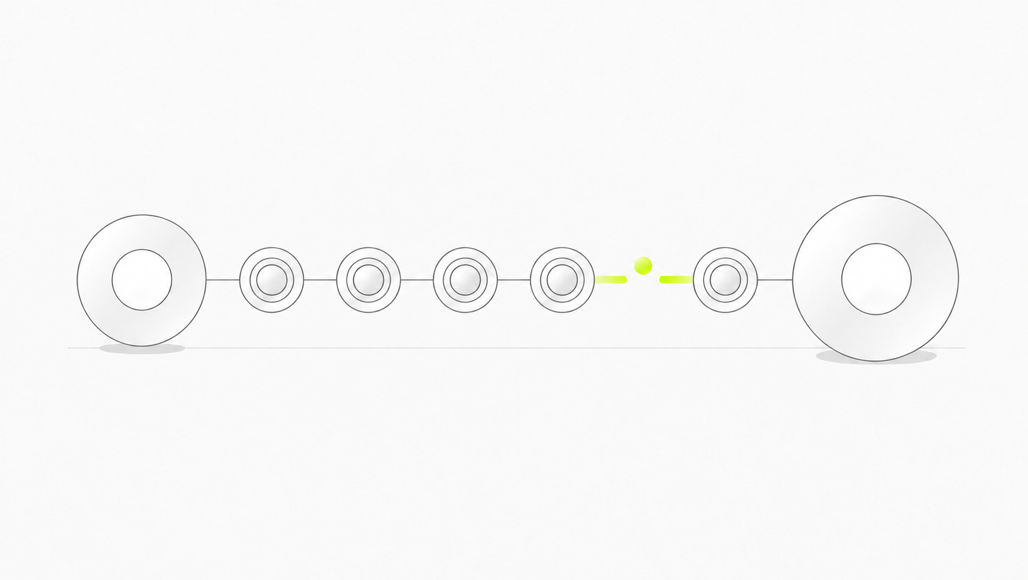
Five things break when a finance team consolidates without a sequence: the audit trail, approvals sitting mid-flow, payments already scheduled, reconciliation between old and new balances, and the access a user needs on day one.
None of these are exotic. They are the predictable result of moving a live process while it keeps running, and each has a specific fix, set out below.
The five failure points, and what causes each one:
- Audit trail gaps. A payment approved in the old system with no matching record surviving in the new one.
- Stuck approvals. An invoice waiting on a signature the old system can no longer route to anyone.
- Payments firing twice or missed, when a supplier payment or payroll run straddles cutover day.
- Reconciliation drift. Opening balances in the new system that do not tie back to the old system's closing balances.
- Access gaps. Nobody holding admin rights in the new system on the morning it actually has to work.
Step 1: Freeze the scope before you touch a single login
Before migrating anything, write down what you are actually running today. Most finance leads underestimate this list, because half of it is a spreadsheet, a shared login, or a forgotten integration.
For every tool currently in use, record:
- Every user with access, and what they can approve or spend.
- Every integration it feeds or reads from: accounting sync, payroll export, bank feed.
- Every scheduled or recurring payment it holds, including standing orders and Direct Debits.
- Every open, unapproved item sitting in it right now.
This audit is the single highest-leverage step in the whole migration. Skip it, and you are consolidating tools you cannot fully see, which is exactly how a scheduled payment gets lost instead of carried across.
Step 2: Decide the order, lowest risk first
Not every system carries the same consequence if the move goes wrong. A reporting spreadsheet migrating badly costs a wrong number for a day. A payroll run migrating badly reaches HMRC and your employees' bank accounts.
Move systems in roughly this order:
- Cash visibility and reporting tools. Nothing here executes a payment, so an error costs you a wrong figure, not a missed transaction.
- Spend cards. You can pause or cap an individual card without disrupting the rest of the business.
- Accounting software. Most other integrations point at this system, so get it settled before adding new dependents on top of it.
- Business bank account. The Current Account Switch Service moves it on a fixed, guaranteed seven-working-day timetable, for eligible businesses with fewer than 50 employees and turnover no higher than £6.5 million, using participating banks.
- Payroll. Leave this until last. It is the hardest to unwind if something goes wrong, and it reports directly to HMRC on a fixed schedule.
Step 3: Export everything before you lose access
Cancelling a tool and exporting from it are not the same event, and treating them as one is the most common mistake in this process. Several vendors keep a closed account readable for a limited window, then restrict it.
Xero's own guidance on exporting data tells the account holder to pull the chart of accounts, contacts, invoices, bills, the fixed asset list, and PDF copies of every filed VAT return and trial balance, while the subscription is still active. Check the cancellation terms for the subscription and retain the required exports before access ends; do not assume read-only access will remain available.
Per outgoing tool, export:
- Accounting software: chart of accounts, contacts, invoices, bills, fixed asset register, and filed VAT returns as PDFs, before the account changes status.
- Spend cards: transaction history, receipts and statements by date range, plus the configuration of any live ledger sync, before closing.
- Payroll: every Full Payment Submission filed in the current tax year, or the year-to-date figures your new provider needs to keep HMRC's Real Time Information record continuous.
- Bank: statements and payment history beyond whatever your new bank pulls in automatically.
BILL's terms say it may retain copies of information after cancellation. That does not promise continued account access, so export and verify the records you need before closing the account.
UK companies must keep accounting records for at least six years from the end of the company financial year, and longer in specified cases. Your export must stay readable for that span, independent of whether the old vendor keeps hosting it.
What happens to your audit trail when you move platforms?
An audit trail is only continuous if every approved action in the old system has a traceable counterpart in the new one. That means matching, not merely exporting: an approved invoice needs its approver, date and amount intact, not just its total.
Two rules keep this true. First, keep the old system in read-only mode for at least one full reconciliation cycle after cutover, so a reviewer can check a disputed figure against the original record. Second, require two people to sign off on the cutover: one confirming the export is complete, one confirming the import matches it line for line.
This is the same discipline AccountingWEB's migration guidance describes as running old and new systems in parallel and reconciling both to the same bank balance before cancelling the old subscription. If the two agree, the migration is clean. If they do not, you have found the gap while both systems are still live to fix it.
Step 4: Handle approvals and scheduled payments on switch day
Cutover day is where a well-planned migration usually still loses a payment, because nobody named the exact moment the old system stopped being authoritative.
Set a freeze window: a fixed point at which the old system accepts no new transactions and every open item is inventoried by its exact status, not just its existence.
- An invoice approved but not paid carries its approver and due date into the new system unchanged, rather than restarting the approval chain.
- A payment inside the freeze window, scheduled for cutover day, either completes in the old system before cutover, or is recreated in the new one with the same execution date, never both.
- A payroll run that straddles cutover stays in the system it started in until it finishes; do not split one pay run across two platforms.
- An approver who is mid-review is told explicitly which system to finish the review in, so an invoice is not silently orphaned between the two.
Name a single freeze window in hours, not days, and communicate it to every approver in writing before it opens. A freeze window nobody was told about is not a control, it is a surprise.
Step 5: Reconcile and set your opening balances
Once the new system holds your migrated data, its opening balance for every account has to tie exactly to the old system's closing balance on the agreed cutover date. Not roughly. Exactly.
Build opening balances as dated entries, one per account, reconciled against a trial balance pulled on cutover day, with every adjusting entry documented rather than absorbed into a single "opening balance" line. Match record counts and balances between old and new systems, and investigate every discrepancy before you rely on the new numbers.
Run a genuine parallel period on your two highest-risk systems, typically the bank and payroll, rather than cutting over both at once. Two weeks of parallel running catches a mismatch while you can still check it against a live old system.
Step 6: Migrate access and permissions last, not first
Access is the step teams most often get backwards. Moving logins before the data and process are settled means people work in a system that is not yet trustworthy, which teaches them to distrust the thing you are consolidating onto.
Sequence access changes to follow, not lead, the migration:
- Confirm data and reconciliation are complete before granting broad access to the new system.
- End transaction rights in the old system at cutover, while retaining named read-only reviewers for the reconciliation period.
- Name at least two admins in every new system before the first one goes live, so a single departure does not lock the business out.
- For the bank leg, the switching service moves eligible Direct Debits, standing orders and the account balance. User permissions and approval mandates still need separate checking with the new bank.
When should you time the cutover?
Not whenever the migration happens to be ready. Three UK deadlines make some weeks riskier than others:
- Making Tax Digital for VAT requires digital records and compatible software for the VAT return. Preserve the records and digital links across a software change; do not confuse VAT periods with the separate Income Tax rules. HMRC explains the VAT requirements.
- Your VAT accounting period should stay in the migration plan until HMRC confirms any change. A March 2026 ICAEW report described delays at that time; it is not evidence of today's processing time.
- Your payroll date can change provider mid-tax-year, but HMRC still expects continuous RTI reporting under the same PAYE reference. A genuinely final submission with the scheme-ceased box only applies if you are closing the PAYE scheme outright, which most consolidations are not doing.
Avoid stacking all three, month end, a VAT filing date and a payroll run, inside one cutover week. Pick the week with fewest live, and build the freeze window around whichever one you cannot move.
What a real consolidation costs you today
Take a 35-person UK scale-up running a bank account, Xero, a spend card platform and a separate payroll tool, with cash position tracked in a shared spreadsheet. That is an ordinary set-up, not an edge case.
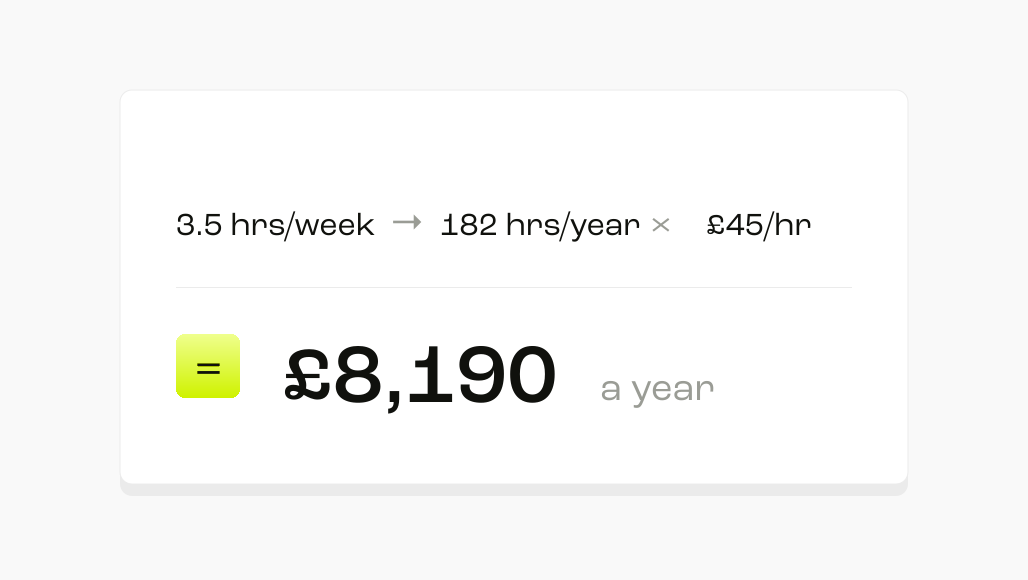
Assume the finance lead spends 30 minutes each working morning reconciling one cash position across four logins, plus an hour a week checking the spreadsheet against the card statement and payroll. That is 3.5 hours a week, or 182 hours a year.
At an illustrative, fully loaded UK finance-manager cost of £45 an hour, that is £8,190 a year spent logging in and reconciling by hand. This is our working assumption, not a benchmark; a connected ledger can identify discrepancies but cannot guarantee that it catches every approval or duplicate payment.
When one platform is not the right move
Consolidation is not automatically the better answer, and a guide that only argues for it has told you nothing useful.
If your business is mid-acquisition, or already committed to an acquirer's finance stack inside the next two quarters, do not run a full consolidation now. You would run the same migration twice inside a year, doubling the exact audit-trail and reconciliation risk this guide exists to reduce. Tighten access and reconciliation controls on your existing stack instead, and hold the platform switch until the timeline is confirmed.
Which platform should you consolidate onto?
That depends on which part of the fragmentation actually hurts you:
- If invoice-to-pay volume is your entire problem, running through a single entity, a dedicated accounts payable platform will usually out-run a broader finance platform on capture depth and procurement-system integrations, because that is the whole product.
- If you have standardised on one accounting system and want zero new logins, staying inside its own payroll and payables modules is the simpler move, in exchange for more manual reconciliation between functions.
If your problem spans treasury cash movement, payables and more than one entity, that is where we would put ourselves. We connect payments to Xero or NetSuite automatically, while WealthKernel provides custody services and BlackRock manages the underlying liquidity funds rather than holding them on our balance sheet.
Where Payroll Payments is enabled for your plan, we can fund and execute a run from a file your provider has calculated. Our pricing page still labels Payroll Payments as coming soon in places, so confirm availability and timing before relying on it. Cash held in a money market fund is invested, not deposited: it is not covered by the FSCS and capital is at risk.
The case against us: automated FX hedging is on our roadmap and not live today, so a business that wants to automate cross-currency exposure immediately should not buy on that promise. A very high-volume, single-entity business may be better served by a dedicated AP specialist.
The test to run before you sign anything
Before you commit to a destination platform, ask every option what happens to an approval, scheduled payment and reconciliation if the migration runs a week over. The option needing fewer frozen systems and exports carries less migration risk.
About the author
Pac O'Shea is Co-Founder and CEO of Round. His work focuses on how finance teams move from manual, informational tools to controlled, auditable automation.
Sources
- Switching Accounting Software? A Practical Migration Checklist for Accounting Firms
- About exporting data out of Xero
- Changing payroll software + RTI (FPS) continuity
- Running payroll: Reporting to HMRC: FPS
- Stop being an employer
- MTD for income tax: delays in changing VAT periods
- How to switch accounting software mid-year (UK sole traders)
- Current Account Switch Service Explained: How To Switch Bank Accounts
- Close a Ramp Checking Account
- BILL General Terms of Service
- Account closure
- Can I change my payroll system in the middle of the tax year?
- RK BK1: A general guide to keeping records for your tax return
- Sage People Migration Cutover | Weekend Orchestration, RTI-Aware
Frequently Asked Questions
No. Migrating in risk order, reporting tools first and payroll last, is safer than one simultaneous cutover, and it lets you catch a problem on a low-risk system before it reaches payroll.
Several vendors move a cancelled account to read-only or restricted access within weeks, which is why the export has to happen while the subscription is still active.
Yes. Your new provider needs your full year-to-date Full Payment Submission history or P11 figures, and HMRC's Real Time Information reporting has to stay continuous under the same PAYE reference.
The Current Account Switch Service guarantees a seven-working-day switch, moving Direct Debits, standing orders and your existing balance automatically, with a guarantee that covers you if something goes wrong.
Keep the old system read-only for at least one reconciliation cycle after cutover, and require two people to confirm the export and the import match line for line.
Plan around your existing dates until HMRC confirms a change. The March 2026 report of delays is historical and does not establish the processing time when you make the request.
Skipping the scope freeze. A migration of tools you have not fully mapped, including every user, integration and scheduled payment, is how a payment gets lost rather than carried across.
No. If you are mid-acquisition or already committed to an acquirer's stack soon, hold the switch and tighten controls on your existing systems instead.