






























Payment-to-ledger controls for Xero, NetSuite and connected banks in 2026
 Copied!
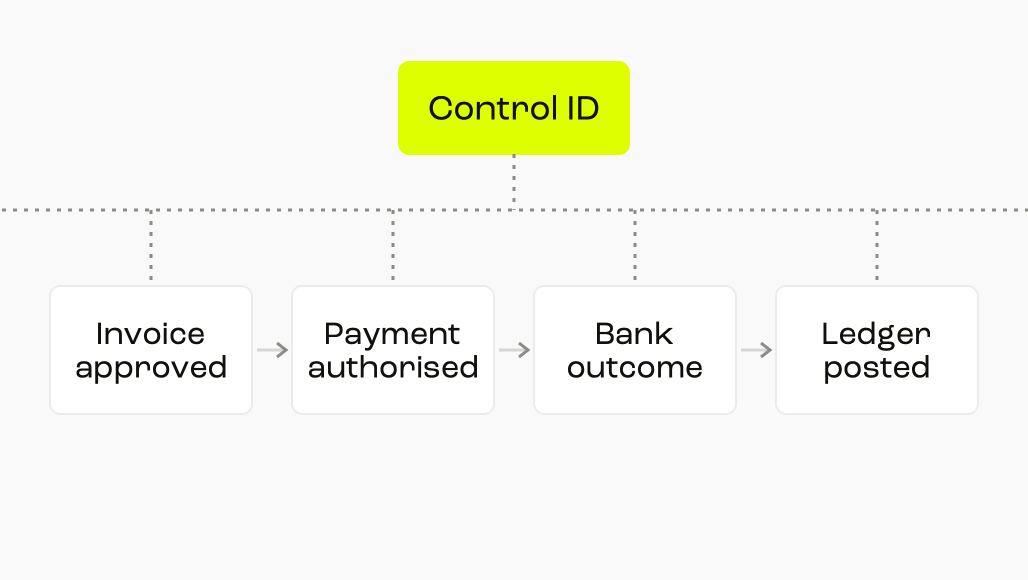
 A trustworthy payment trail binds four records to one control ID: the approved invoice, the authorised payment instruction, the bank's settlement evidence and the posted ledger transaction.
A trustworthy payment trail binds four records to one control ID: the approved invoice, the authorised payment instruction, the bank's settlement evidence and the posted ledger transaction. Your control should expose any broken link before the period closes.
This guide shows how to assign ownership across Xero, NetSuite and connected banks without pretending that one platform contains the whole truth.
TL;DR
- Give every payable a persistent payment control ID that survives exports, API calls and ledger posting.
- Keep invoice approval, payment authorisation, bank settlement and ledger posting as four separate evidence states.
- Let automation propose links, but send ambiguous, duplicated or changed records to a named human owner.
- Reconcile by legal entity, bank account, currency and value date before comparing only the headline total.
- Test the trail by sampling from both ends: invoice to bank and bank to invoice.
See how we connect invoice preparation, payment approval and ledger records
What should the end-to-end control prove?
The control must answer a simple question: can a reviewer move from the original obligation to the final accounting entry without relying on someone's memory?
That requires four distinct assertions. An invoice was valid and approved. A payment was authorised for the same obligation. The bank recorded the expected outcome. The ledger posted the right amount to the right entity, supplier and period.
Companies House says limited companies must retain accounting records for six years from the end of the relevant company financial year, subject to listed exceptions. See the company record-keeping guidance.
Design retention around that obligation, not around the shortest history window offered by one connected product. Preserve original invoices and bank evidence alongside the operational record.
Start with one payment control ID
A control ID is not the invoice number alone. Supplier invoice numbers can collide, be corrected or appear in several entities. The ID should be generated once when the payable enters your controlled workflow.
Carry these fields with it:
- Legal entity and ledger company
- Supplier master ID, not only the display name
- Invoice number, invoice date and due date
- Gross amount, tax amount and currency
- Payment batch and instruction identifiers
- Bank account and bank transaction reference
- Ledger document, posting period and reconciliation status
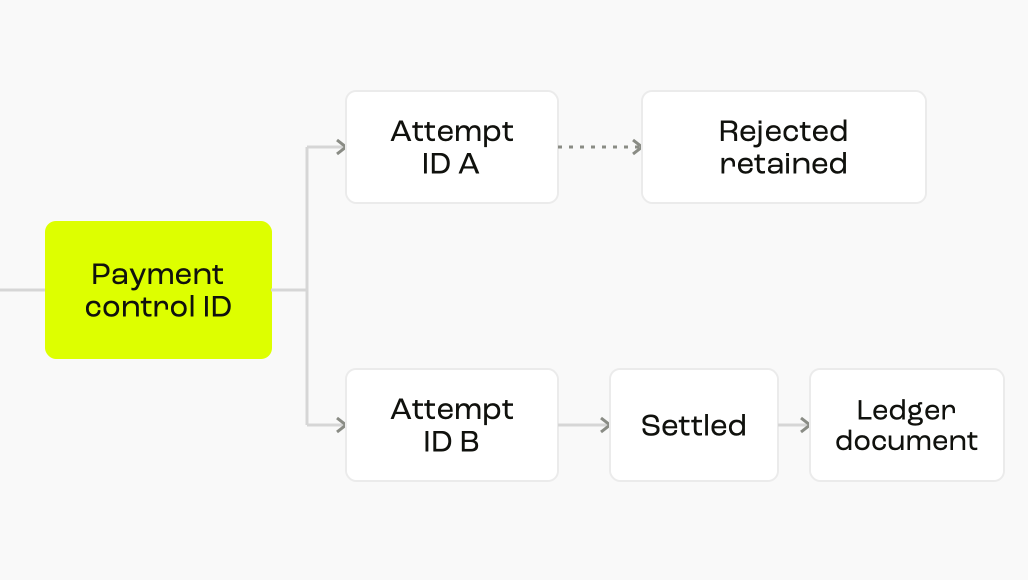
Do not overwrite an old identifier when a payment is rejected and resubmitted. Keep a parent control ID for the obligation and a child attempt ID for each instruction. That distinction makes retries visible without creating a second payable.
The Open Banking Domestic Payments model includes payment status and the time that status was updated in its response. See the Domestic Payments data model. Treat those fields as bank-side evidence, not as substitutes for your internal approval record.
Set field ownership before integrating anything
Integration design fails when two systems can silently rewrite the same field. Decide which system owns each value, which systems receive it and what happens when a receiving system disagrees.
Field ownership matters more than the number of integrations. A clean one-way update with an explicit exception is usually easier to audit than bidirectional updates with unclear precedence.
Control the invoice before cash moves
The strongest payment control begins before the bank instruction. Approval should bind the supplier, bank details, legal entity, amount, currency and supporting invoice at the moment the approver acts.
In Round Treasury, we read invoices and prepare payments for approval. Our AP workflow flags duplicate bills, unusual amounts and changed supplier details. That can bring an exception to the person making the decision before the payment moves. Your finance team still owns the approval rule and the evidence it requires.
For changed bank details or a new payee, separate the verification from the payment approval. The person who edits the supplier master should not provide the only evidence that the change is valid.
Use a release checklist:
- Confirm the supplier record is active for the paying entity.
- Compare invoice data with the purchase order, receipt or documented non-PO exception.
- Check whether bank details changed after the invoice entered the workflow.
- Record independent verification for a new or changed beneficiary.
- Require the named approvers for the amount and entity.
- Freeze the approved payment payload or record any later change as a new approval event.
The NCSC warns that criminals may send a convincing invoice or request payment to a different bank account. See the business payment fraud guidance.
Pay.UK says Confirmation of Payee allows an account name to be checked before a payment is initiated or collected. See how Confirmation of Payee works. Record the result where your bank provides it, but keep your own change-verification procedure as the controlling evidence.
As checked on 24 September 2026, NetSuite's Vendor Bill Approval Workflow identifies quantity or cost discrepancies between a vendor bill and its purchase order. See Oracle's workflow documentation. Configure the exception route deliberately rather than assuming every bill follows a purchase-order path.
Preserve bank evidence, not just the feed
A bank feed is an evidence channel. It is not proof that the approved instruction, bank outcome and ledger entry are the same object. Preserve identifiers and statuses before compressing them into a reconciled flag.
For each attempt, retain:
- Originating account and legal entity
- Beneficiary name and account fingerprint
- Instruction amount, currency and requested date
- Internal batch and approval references
- Bank instruction and transaction references
- Status, status timestamp and rejection reason where available
- Statement amount, value date and narrative
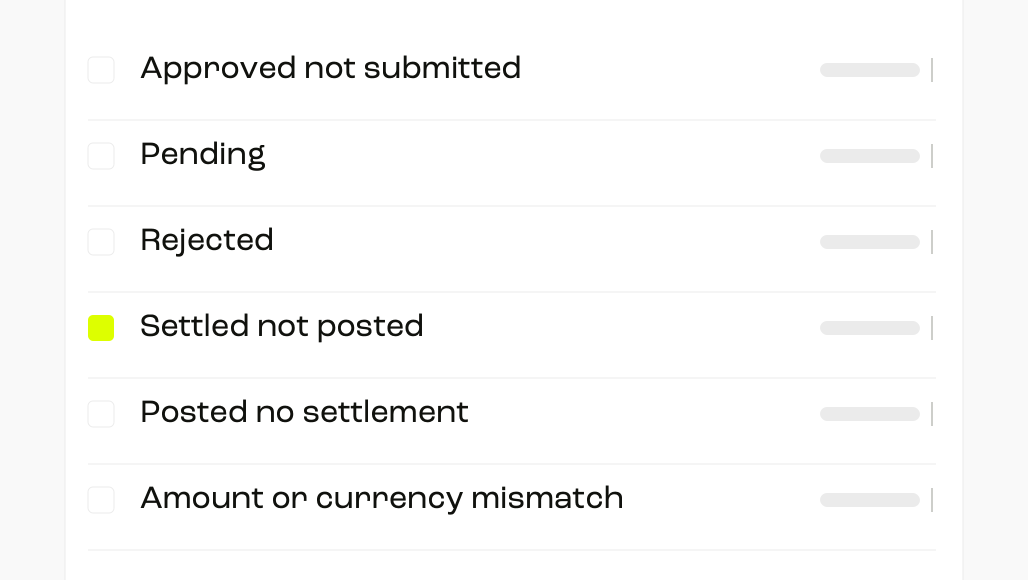
Do not treat submitted, accepted and settled as synonyms. A submitted instruction may still be pending or rejected. A settlement line may arrive later than the approval and posting events.
Xero says JAX only automatically reconciles when it is highly confident. See Xero's reconciliation description. Your policy should still define which categories may be automatically reconciled and which require review.
Xero also allows bank statements to be uploaded when a direct feed is unavailable. See Xero's bank-feed options. Mark manual imports clearly so a later feed refresh cannot disguise a duplicated source.
As checked on 24 September 2026, NetSuite's Match Bank Data page is designed to review and match imported bank and credit-card transactions before account-statement reconciliation. See Oracle's matching procedure.
Post once, then reconcile the right objects
Posting should consume the approved obligation and confirmed payment outcome. It should not create a fresh payable from the bank narrative. Preserve the supplier, invoice and control IDs on the resulting transaction.
The reconciliation should compare several dimensions before clearing the item:
- Entity: the payer and ledger company agree
- Account: the expected bank or clearing account was used
- Currency: transaction and ledger currency treatment agree
- Amount: invoice, payment and settlement differences are explained
- Timing: posting date, value date and period treatment are intentional
- Uniqueness: one settlement clears one intended payable or documented group
HMRC says VAT records include invoices received and issued, while general business records include bank statements and cash records. See the VAT record guidance.
Where software products collectively maintain the electronic account, HMRC says copy and paste does not constitute a digital link. See VAT Notice 700/21. Design controlled transfers and retain the original evidence instead of building a spreadsheet bridge that nobody owns.
Build an exception queue finance can own
The queue should identify the failed assertion, the money affected, the accountable owner and the next action. A generic unreconciled bucket produces activity without control.
Set ageing from the event that created the exception. A pending bank outcome might age from submission, while an unposted settlement should age from value date. One clock cannot describe both risks.
A quantified control scenario
Illustrative assumptions: +600 supplier payments per month, at +£300 per payment. Assume 12% enter an exception queue and each exception takes six minutes to classify and assign.
- Monthly payment volume: +600 payments/month × +£300/payment = +£180,000/month
- Exception volume: +600 payments/month × +12% = +72 items/month
- Initial handling: +72 items/month × +6 minutes/item = +432 minutes/month
- Initial exception workload: +432 minutes/month ÷ +60 minutes/hour = +7.2 hours/month
- Reviewing every payment: +600 payments/month × +2 minutes/payment = +1,200 minutes/month, or +20 hours/month
These are labelled assumptions, not a projection of expense or savings. The arithmetic is a control-design illustration; it does not estimate the value of automation or the outcome for any team.
The calculation also exposes a design test. If your system cannot count exceptions by cause, owner and age, it cannot support this workload estimate or show whether automation is moving effort to the right place.
How should Xero and NetSuite coexist with the control?
Use the accounting platform as the posting record for the entities maintained there. Use the controlled payment workflow for approval and instruction evidence. Use the bank as the authority for its transaction outcome.
As checked on 24 September 2026, NetSuite system notes record each transaction change and can show its date, user, field and old and new values. See Oracle's system-notes documentation.
NetSuite's Bank Feeds Audit Trail covers bank-feed activity within a 90-day period. See Oracle's Bank Feeds Audit Trail documentation. That product window is one reason to export or preserve the evidence needed by your longer retention policy.

Do not force both ledgers to become co-owners of the same payable. If different entities use different platforms, apply the same control ID and evidence contract, then maintain a separate mapping for each platform's document identifiers.
Run the control on a fixed rhythm
A durable trail is produced continuously, then tested at deliberate intervals. Waiting for month end turns small mapping defects into a close problem.
- Daily: review rejected, duplicated and settled-unposted items.
- Weekly: review aged pending items, changed beneficiaries and manual imports.
- At close: reconcile bank accounts, payment clearing accounts and open payables by entity and currency.
- Quarterly: sample both directions, test access and approval limits, and inspect configuration changes.
Sample from invoice to bank to detect obligations that were approved but never settled. Sample from bank to invoice to detect cash movements that lack a valid payable trail.
Your close sign-off should state unresolved exceptions by count, value, age and owner. A zero difference in the general ledger is useful, but it does not prove that every payment followed the intended approval route.
Where Round Treasury fits in payment-to-ledger controls
We fit teams that want invoice preparation, payment approval and accounting sync connected across their finance workflow. Choose the simplest architecture that preserves the four assertions and their identifiers. Apply the same control contract whether an entity posts in Xero or NetSuite, then document which system owns each field and exception.
We send invoices uploaded to Round into Xero and, through Apideck, into NetSuite. Round account activity updates Xero bank feeds, while our NetSuite integration reflects Round transactions in the accounting record. Those flows help link preparation and posting, but a sync result alone cannot prove who approved a payment or that the bank settled it.
Test our workflow in your actual configuration:
- Walk through an approved invoice, a changed payee and a rejected or delayed payment.
- Check which identifiers survive each transfer, where exceptions appear and what bank and approval evidence your team must retain.
- Treat the persistent control ID in this guide as a design requirement to test, not a claimed Round feature.
- Confirm your available approval scope. As at 30 September 2026, our pricing page marks advanced approval rules and routing as coming soon.
The case against adding another operating layer is straightforward. If your native workflow already binds invoice approval, payment evidence, settlement and posting with owned exceptions, adding another system may create more reconciliation rather than less.
- Test the decision with one month of real payments.
- Select ten from the invoice register and ten from the bank statement.
- Confirm that a reviewer can trace every sample in both directions, identify each approver and explain every exception.
Sources
- GOV.UK: Company and accounting records
- GOV.UK: Keeping VAT records
- HMRC: VAT Notice 700/21
- NCSC: Business payment fraud
- Pay.UK: Confirmation of Payee
- Open Banking: Domestic Payments v3.1.11
- Xero: Bank reconciliation
- Xero: Bank feeds
- Oracle NetSuite: Matching Bank Data
- Oracle NetSuite: Vendor Bill Approval Workflow
- Oracle NetSuite: Transaction System Notes
- Oracle NetSuite: Bank Feeds Audit Trail
- Round Treasury: General Risk Disclosure
- Round Treasury: Invoice Automation
- Round Treasury: Accounts Payable
- Round Treasury: Xero Integration
- Round Treasury: NetSuite Integration
- Round Treasury: Pricing and Feature Availability
Nothing within this blog is intended to be a recommendation. Round does not offer financial advice.
Frequently Asked Questions
It should be the authoritative evidence for the bank transaction it reports. It should not replace the invoice, approval or ledger record.
Not reliably. Numbers can collide across suppliers or entities and can change after a correction. Use an internal control ID and retain the invoice number as an attribute.
Define completion explicitly. For this control, the operational trail is complete only when the bank outcome is terminal and the intended ledger posting is matched.
No. Set materiality and ageing rules, but require every unresolved item to have an owner, reason and documented treatment.
Keep the original obligation under one parent control ID. Give each instruction attempt its own child ID, bank status and outcome.
Test identifiers, field ownership, duplicates, rejected payments, partial payments, currency differences, reversals and the audit record for automated and manual changes.
No. Reconciliation shows that records can be matched. Approval evidence shows that the payment was authorised under the intended policy. You need both.